WhatsApp CRM for small business in India: a practical guide
Short answer: a WhatsApp CRM keeps every customer chat on the customer's record instead of on one salesperson's phone. Small teams can start with click-to-chat from their own phones, then move to a WhatsApp Business Platform number for approved templates, a shared inbox, read ticks and broadcasts to opted-in customers, with STOP replies honoured.
Disclosure: this guide is published by LeadSetu, which makes a CRM. Where we describe how LeadSetu handles WhatsApp, we say so, including what it does not do. We name no other CRM vendor here; for side-by-side comparisons see our compare page.
Contents
- Why chats on personal phones hurt a small business
- The two ways a CRM can work with WhatsApp
- Templates, the 24-hour window and costs
- How to set up WhatsApp in a CRM
- Broadcasts without getting your number blocked
- What LeadSetu does and does not do
- Frequently asked questions
Why chats on personal phones hurt a small business
In most small Indian businesses, the sales process already runs on WhatsApp. A customer sees your listing, sends a message, gets a catalogue PDF and a price, and replies a week later. The trouble starts when that conversation lives only on one person's phone:
- The history leaves with the person. When a salesperson changes jobs, their chats, and often the customers, go with them.
- Nobody else can pick up. If the owner is travelling or the executive is on leave, the customer waits.
- Follow-ups depend on memory. There is no reminder that a customer asked for a revised quote on Thursday.
- The owner cannot see what was promised. Discounts, delivery dates and payment terms agreed in chat are invisible to everyone else.
- Mass forwards from a personal number risk a block. Sending the same offer to hundreds of contacts from a normal WhatsApp account is the quickest way to get the number restricted.
A WhatsApp CRM does not replace WhatsApp. It makes each conversation part of the customer's record, next to their calls, quotes, invoices and tasks.
The two ways a CRM can work with WhatsApp
| Click-to-chat from your own phone | WhatsApp Business Platform number | |
|---|---|---|
| What you need | Your existing WhatsApp or WhatsApp Business app | A number connected to the Cloud API |
| How a message is sent | The CRM opens WhatsApp with the message ready; you press send | The CRM sends it directly |
| Replies | Arrive on your phone | Arrive in the CRM's shared inbox |
| Logged on the customer record | The sent message is logged | Both sides of the conversation |
| Templates | Your own saved texts, no approval | Message templates approved by Meta |
| Broadcasts | Not suitable | To opted-in contacts, throttled |
| Delivered and read ticks in the CRM | No | Yes |
| Cost | No message charges | Meta charges for template conversations; check Meta's current rates |
Click-to-chat suits a team of two to five people who each look after their own customers. The Business Platform suits a team that shares one number, wants replies visible to everyone, or needs reminders and broadcasts at scale. Many businesses start with the first and move to the second once volume grows.
Templates, the 24-hour window and costs
The WhatsApp Business Platform has rules that every CRM has to follow, because they come from Meta, not the CRM:
- The 24-hour window. After a customer messages you, you can reply in free text for 24 hours. Outside that window, you can only start a conversation with an approved template.
- Template categories. Templates are submitted as marketing, utility or authentication. Meta reviews each one and decides the category, and charges differ by category. Keep payment reminders and order updates factual so they fit utility.
- Parameters. A template uses numbered placeholders such as {{1}} and {{2}}, which the CRM fills from the customer record, for example the name and the invoice number.
- Opt-in. Customers should agree to receive messages before you send them anything promotional.
On costs: the CRM vendor and Meta are separate bills. Ask every CRM vendor whether they add a mark-up on messages, whether WhatsApp is a paid add-on, and whether you must use their own provider. Take prices from each vendor directly; they change often.
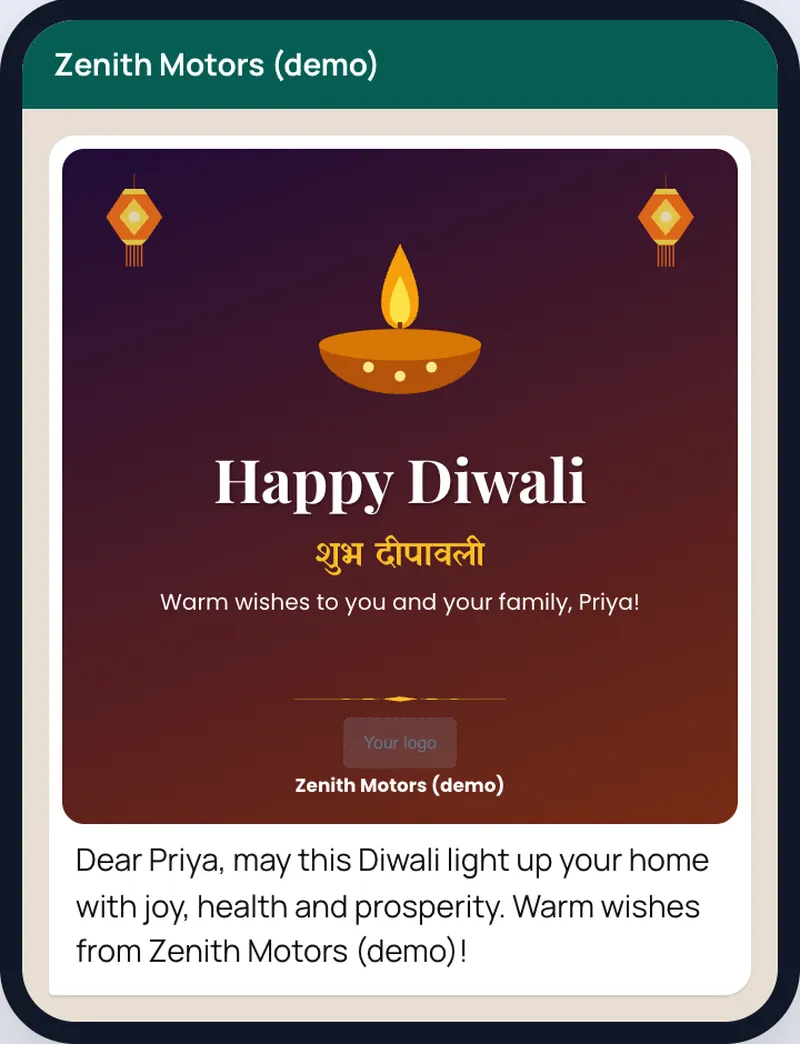
LeadSetu's greeting card designer with demo data, previewing a Diwali card as a WhatsApp message sent in the business's own name.
How to set up WhatsApp in a CRM
These steps follow LeadSetu's screens. The order works in most CRMs.
- Write two or three click-to-chat templates for the messages your team types every day: a first reply to an enquiry, a quote follow-up and a payment reminder. In LeadSetu they live under CRM settings > WhatsApp & calls, and merge fields fill in the lead's details.
- Ask the team to send from the lead page using the WhatsApp button, so each message is logged on the timeline even before you connect a business number.
- When you are ready for a shared number, get a WhatsApp Business (Cloud API) number. Check Meta's current rules for moving an existing number before you decide which number to use.
- Connect it in CRM > Marketing > Inbox & calls > Channel settings: pick WhatsApp, enter the number's details and keys, and give the provider the callback URL shown. LeadSetu also has a test mode that works without an account.
- Create message templates under WhatsApp templates: a lowercase name with underscores, the language, the category, an optional header and footer, and a body with {{1}}-style parameters mapped to lead fields. Submit them for approval.
- Record opt-ins. On a lead, use Record opt-in before adding the contact to any broadcast.
- Use the Inbox tab for two-way chat. Messages from an unknown number can create a new lead automatically.
- Add WhatsApp to your automation, for example an approved template that confirms a booking, or a payment link sent with a UPI QR.
Broadcasts without getting your number blocked
Broadcasts are useful for festival offers, new stock or a price revision, and they are where small businesses most often get into trouble. A few habits help:
- Send only to people who opted in. In LeadSetu, broadcasts need an opt-in by default and are throttled.
- Honour STOP immediately. A customer who replies STOP is opted out; START opts them back in. Leads marked do-not-contact, with consent withdrawn or on your do-not-contact list are never messaged.
- Segment. Send the stainless steel offer to buyers of stainless steel, not to every contact you have ever had.
- Keep templates honest and useful. A message people block or report hurts your number's standing with Meta.
- Watch the read and reply ticks. If a broadcast gets few reads, the list or the message needs work.
For greetings, LeadSetu has occasions and a greeting card designer: festival, birthday and anniversary greetings with your own card and offer, sent on WhatsApp, email or SMS in your business's name, with a report on who read, replied and bought.
What LeadSetu does and does not do
What it does, from our product documentation:
- Click-to-chat on every plan, with team templates and logging on the lead's timeline. No business account needed.
- Your own WhatsApp Business (Cloud API) number, with template creation and approval, sending from the lead page, two-way chat in the inbox, delivered and read ticks and broadcasts to a segment.
- Payments over WhatsApp. An invoice or quote can go out with a payment link and a UPI QR. Inside the 24-hour window a free-text link is sent; outside it, the approved template you picked is used, or WhatsApp opens with the message ready.
- Automatic reminders before and after an invoice's due date, by email and, if you choose, WhatsApp.
- Templates in the outreach library in English, Hindi and regional languages.
What it does not do: LeadSetu never sends from its own WhatsApp number; you connect yours, and Meta bills its message charges to you. Only approved templates can be sent from the Business account. Sending WhatsApp messages needs a connection, so it does not work in offline mode. If you need something not listed here, ask us before you decide.
To see this with sample data, start the 24-hour CRM trial. The WhatsApp and calling page summarises the channels, and CRM software for Indian businesses covers GST, languages and branches. If you are comparing CRMs more broadly, read how to choose CRM software in India and our CRM for real estate in India guide for an industry example.
Frequently asked questions
Can I use my existing WhatsApp number with a CRM?
For click-to-chat, yes: the CRM opens your own WhatsApp with the message ready. For the Business Platform, whether an existing number can move to the Cloud API, and what happens to its use in the app, depends on Meta's current rules for your account. Check them first; some businesses keep a separate number for the shared inbox.
Is a WhatsApp CRM the same as the WhatsApp Business app?
No. The Business app is for one phone, or a few linked devices, with a catalogue and quick replies. A WhatsApp CRM connects chats to customer records, tasks, quotes and invoices, and lets a team share one number through the Business Platform.
Who pays for WhatsApp messages sent from a CRM?
Meta charges for template conversations on the Business Platform. Some CRMs pass these on with a mark-up or sell WhatsApp as an add-on; ask each vendor. In LeadSetu you connect your own number and Meta bills its charges to you directly.
Can a customer stop receiving messages?
They should always be able to. In LeadSetu, a STOP reply opts the customer out, START opts them back in, and do-not-contact leads are never messaged by broadcasts or the WhatsApp shortcuts.
Do I need WhatsApp templates for every message?
Only to start a conversation, or to reply after 24 hours have passed since the customer's last message. Within the 24-hour window you can reply in free text from the inbox.
Related reading
- All CRM guides
- LeadSetu CRM and industry CRM templates
- WhatsApp and calling in your CRM
CRM guide WhatsApp Small business India