
CRM with multiple branches: how to run a chain from one system
Short answer: a multi-branch CRM should model your head office, regions and branches as a tree, file every lead, deal and invoice under a branch, route new enquiries by city or PIN code, let each branch see only its own customers, keep a GSTIN and number series per branch, and roll every branch's numbers up to head office.
Disclosure: this guide is published by LeadSetu, which makes a CRM with branches. Where we describe LeadSetu, we say so, including its limits. We name no other vendor here; for side-by-side comparisons see our compare page.
Contents
- The problems that appear with the second branch
- Five decisions to make before you set up branches
- Ways to run several branches compared
- How to set up branches in a CRM
- Reading the whole chain at a glance
- What LeadSetu does for multi-branch businesses
- Frequently asked questions
The problems that appear with the second branch
A business with one location can run on one shared list. The day a second showroom, clinic, centre or sales office opens, new questions appear:
- Who gets this enquiry? A lead from Nashik arrives at the Pune office's email. Somebody forwards it, late, or nobody does.
- Who can see what? The Ahmedabad team should not browse Surat's customers, but the owner wants to see everything.
- Which GSTIN is on the invoice? A branch in another state is usually a separate GST registration, with its own invoice series.
- How is each branch doing? The owner calls each branch manager for numbers, and each one counts differently.
- Who owns a customer who visits two branches? Without a single record, both branches chase the same person.
Many businesses solve this with a separate spreadsheet or even a separate CRM account per branch. That keeps branches apart, but it also hides the whole picture from head office and makes moving a customer between branches painful. A CRM with real branch support keeps one database with clear boundaries inside it.
Five decisions to make before you set up branches
1. The shape of your tree
Write down your structure: head office, then regions or zones if you have them, then branches. Keep it as simple as your reporting needs. A two-level tree (head office and branches) is fine for many businesses.
2. Who belongs where
Each person should have a home branch. Some people, such as a regional sales head or an area manager, work across several branches and should be given those too.
3. Who sees what
Decide whether a sales rep sees only their own records, their branch, or more. Branch managers usually see their branch, regional heads their region, and the owner and admins everything.
4. How leads are routed
Decide the rule for each branch: by city, by PIN code, by product line or by the source. Then decide what happens inside the branch: round-robin among its people, or to the branch manager for assignment.
5. How billing works
If branches have their own GST registrations, each needs its own GSTIN, state, address, bank details and invoice number prefix. Decide whether branches keep separate books in your accounting software.
Ways to run several branches compared
| Approach | Head office view | Branch privacy | Moving a customer between branches | GST per branch |
|---|---|---|---|---|
| One shared spreadsheet | Yes, but messy | None | Easy, uncontrolled | Handled elsewhere |
| A separate CRM account per branch | No single view | Complete | Export and re-import | Each account separate |
| One CRM, branch as a tag or field | Yes | Weak: depends on discipline | Change the tag | Often handled elsewhere |
| One CRM with a branch tree and branch access | Yes, rolled up | Enforced by the system | Move with related records | Billing entity per branch |
The last row is what a growing chain usually needs: one system, with boundaries the system enforces.
How to set up branches in a CRM
These steps fit most CRMs that support branches; where a step names a screen, it is LeadSetu's (CRM settings, Branches).
- Create the head office, then add regions under it if you use them, then the branches, each with its code, city, state and PIN code.
- In each branch's people list, mark its managers and the people whose home branch it is.
- Link each branch to its billing entity: GSTIN, state, address, bank details and number prefix, or create one for the branch.
- Add lead routing rules, such as "city is Pune" or "PIN code is one of a list", and choose round-robin over the branch's people or assignment to its manager.
- Set the record scope for each role, for example sales reps see their branches and every branch below them.
- Enter monthly revenue and deal targets for each branch.
- Move existing leads and deals into the right branches in bulk; a lead's deals, tasks and tickets should move with it.
- Update workflows and approvals to use the branch, for example "assign to the branch manager" or "send the discount approval to the manager of the owner's branch".
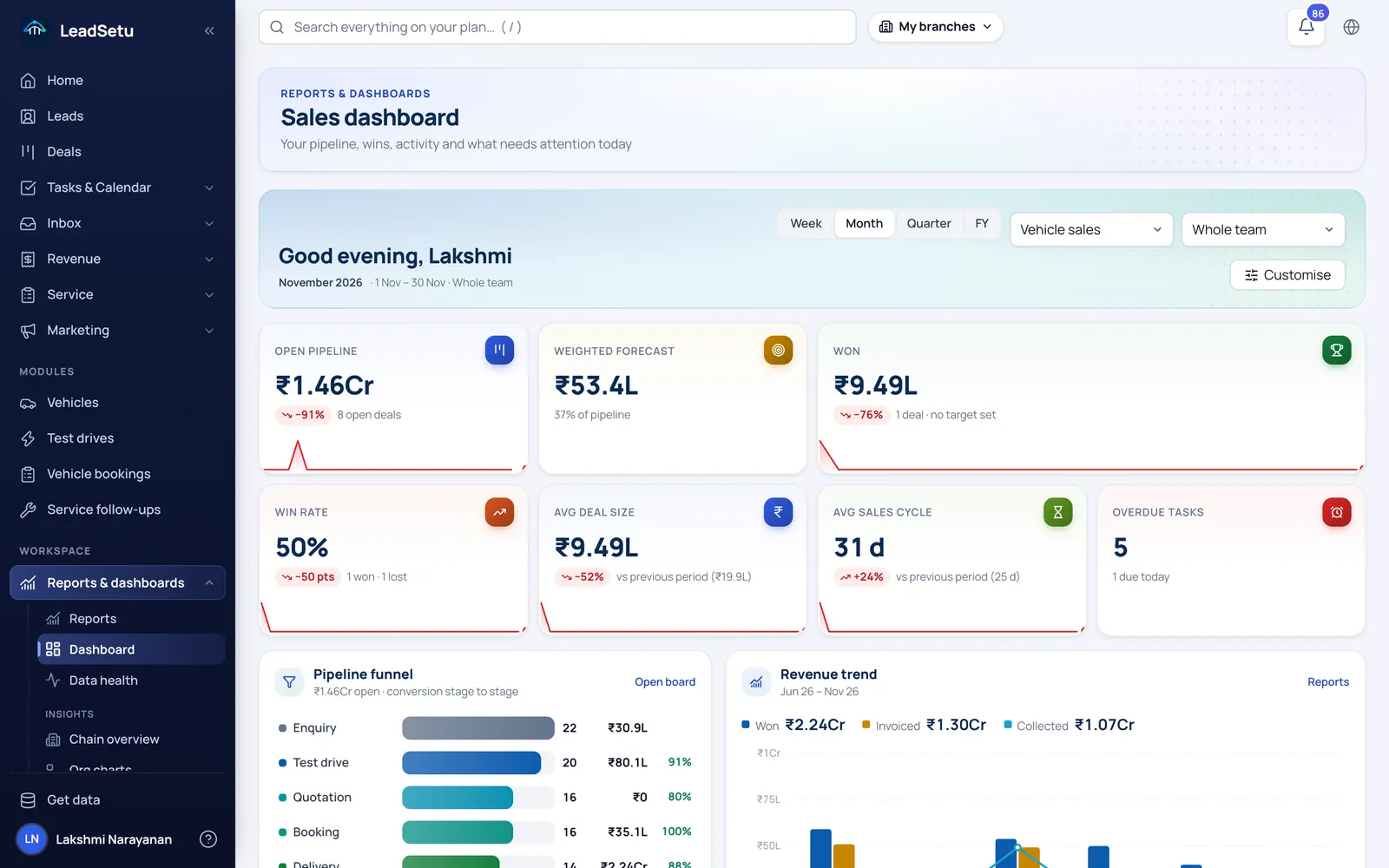
The LeadSetu sales dashboard with demo data. With branches set up, a branch picker narrows every dashboard and report to one branch or the whole chain.
Reading the whole chain at a glance
Once records belong to branches, head office can compare like with like. Useful measures per branch:
- new leads and their sources;
- open pipeline, weighted pipeline and deals won;
- conversion (won out of closed);
- invoiced, collected and overdue amounts;
- open support tickets and first-response time;
- activities done and won value against target.
Regions should add up the branches below them, so a zonal head sees the zone and can drill into any branch. A leaderboard of branches and of people inside a branch is a simple monthly review. For businesses that keep accounts in the CRM, profit and loss by branch with a consolidated column completes the picture.
What LeadSetu does for multi-branch businesses
From our product documentation:
- A branch tree. Head office, regions (or zones and areas) and branches, as many levels as you need, up to 500 branches per team. Deactivate a closed branch instead of deleting it, so its history stays in reports.
- Records belong to a branch. Leads, deals, tasks, activities, support tickets, quotes, orders, invoices, payments, credit notes, purchases, expenses, journal entries, campaigns, calls and conversations, and custom module records each carry a branch. Documents follow their parent: an invoice from an order lands in the order's branch.
- Branch access. A record scope that limits people to their branches and those below them, applied to lists, records opened by link, exports, reports, dashboards, search, the calendar and the chain overview. Branch managers see their branch; regional heads see their region; admins see everything.
- A billing entity per branch. Its own GSTIN, state, address, bank details and number prefix.
- Lead routing. Rules by city or PIN code put a new lead in a branch and hand it to the next person in the branch's round-robin pool, or to its manager. Portal leads follow the same branch rules, and branch cities count as your service area in the portal lead quality check.
- Targets and the chain overview. Monthly targets per branch, and one screen with every branch's leads, pipeline, wins, invoicing, collections, tickets, activity and targets, rolled up through regions, with compare, leaderboards, CSV or XLSX download and books by branch.
- Workflows and approvals. Conditions can test the branch, actions can assign to the branch manager, and approval steps can go to the manager of the record owner's branch.
Honest limits: moving an issued quote, order or invoice to another branch does not change the GST seller it was issued as. There is no stock or warehouse module yet, so branch-wise stock and stock transfers are not available. Branch-wise books start from the day branches were set up. Every change to the tree, people, rules, targets and record moves is written to the audit log.
If your branches send invoices to Tally, read the Tally CRM integration guide: Tally sync supports one Tally company per billing branch. For field teams working out of several branches, see field sales CRM that works offline. Car dealers with several showrooms may also want CRM for car dealers in India.
You can explore the CRM with an industry template in a 24-hour CRM trial, with no card, and read more about the CRM and CRM for Indian businesses.
Frequently asked questions
Should each branch have its own CRM account?
Usually not. Separate accounts keep branches apart but hide the whole picture from head office, and moving a customer between branches means exporting and importing. One CRM with branch access gives privacy and a combined view.
Can a branch in another state invoice under its own GSTIN?
Yes, if the CRM supports a billing entity per branch. In LeadSetu, each branch can carry its own GSTIN, state, address, bank details and number prefix, and documents are issued as that branch's seller.
How are leads assigned to the right branch automatically?
With routing rules on fields such as city or PIN code. When a new lead matches a branch's rule, it is filed in that branch and assigned to the next person in the branch's pool, or to its manager.
Can a regional manager see all the branches in their region?
Yes. In LeadSetu, the manager of a region sees every branch below it, and numbers in the chain overview roll up from branches to regions to head office.
What happens to a lead's deals and tasks if I move it to another branch?
In LeadSetu, moving a lead to another branch moves its deals, tasks and tickets with it. Issued quotes, orders and invoices keep the GST seller they were issued as.
Related reading
- All CRM guides
- Industry CRM templates
- CRM with GST invoicing
CRM guide Branches Multi-location India